
This article provides an overview of the main ORBNET Streaming Engine installers, complementary installers, required Microsoft components, deployment types, and example HTML viewer files.
The installers are used to provide video streaming, Milestone XProtect integration, standalone stream handling, middleware video delivery, and optional RTSP load balancing across multiple Streaming Engine nodes.
Installer overview
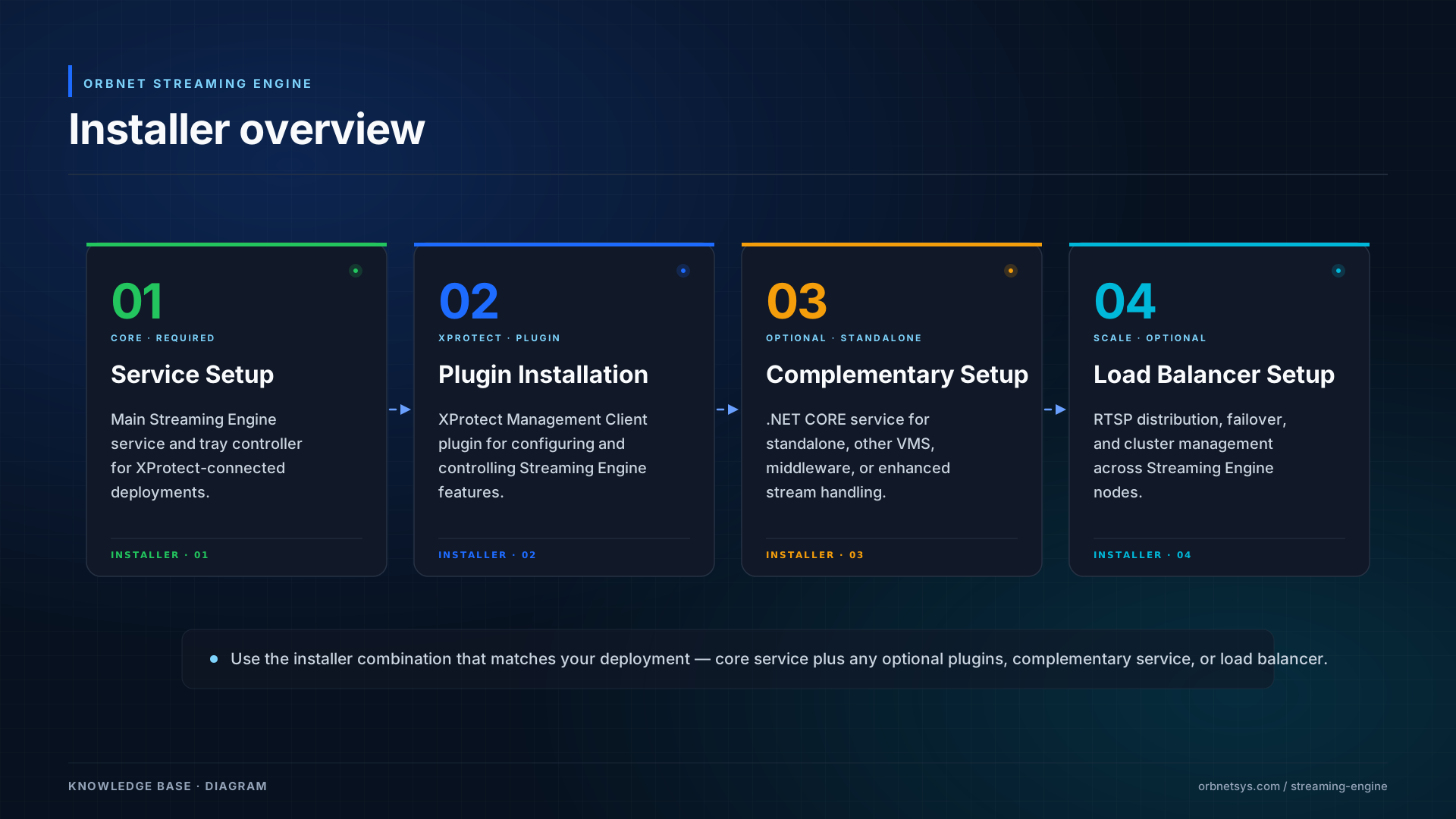 ORBNET Streaming Engine installer overview, showing the standard service setup, XProtect plugin installation, complementary performance services, and optional load balancer setup.
Which installer do I need?
Use the table below to identify the correct installer for your deployment.
| Requirement | Recommended installer |
|---|---|
| I am connecting Streaming Engine to Milestone XProtect | Use ORBNET Streaming Engine Service Setup vx.x.xx.msi. The XProtect plugins are optional, but recommended if you want to manage Streaming Engine features directly from XProtect Management Client. |
| I want to manage Streaming Engine from XProtect Management Client | Use ORBNET Streaming Engine Plugins Setup vx.x.xx.msi in addition to the main Streaming Engine service installer. |
| I want to use Streaming Engine with another VMS | Use ORBNET Streaming Engine Service Setup NET CORE vx.x.xx.msi. This is suitable when Streaming Engine is being used outside a standard Milestone XProtect-connected deployment. |
| I want to use Streaming Engine as a standalone service | Use ORBNET Streaming Engine Service Setup NET CORE vx.x.xx.msi. This can be used to receive streams such as RTMP and SRT without requiring a Milestone XProtect connection. |
| I want to use Streaming Engine as middleware for web-enabled video or viewing | Use ORBNET Streaming Engine Service Setup NET CORE vx.x.xx.msi, depending on the deployment model and required protocols. This is suitable where Streaming Engine provides video to web applications, viewers, or external systems. |
| I want to distribute RTSP requests over multiple Streaming Engine nodes | Use ORBNET Load Balancer Service Setup vx.x.xx.msi. |
| I want failover or cluster management across multiple Streaming Engine servers | Use ORBNET Load Balancer Service Setup vx.x.xx.msi with multiple Streaming Engine nodes. |
Recommended installation order
For a standard Milestone XProtect-connected deployment, the recommended installation order is:
| Step | Action | Notes |
|---|---|---|
| 1 | Install required prerequisites | Install the required Microsoft .NET components where needed. |
| 2 | Install the Streaming Engine service | Use ORBNET Streaming Engine Service Setup vx.x.xx.msi. |
| 3 | Configure the Streaming Engine service | Use the tray controller or available configuration tools. |
| 4 | Connect Streaming Engine to Milestone XProtect | Configure the connection to the required XProtect system. |
| 5 | Install the XProtect plugins | Use ORBNET Streaming Engine Plugins Setup vx.x.xx.msi if XProtect Management Client control is required. |
| 6 | Optional: install the NET CORE service | Use where enhanced performance, standalone operation, or middleware use is required. |
| 7 | Optional: install the Load Balancer service | Use where RTSP requests need to be distributed across multiple Streaming Engine nodes. |
| 8 | Test the deployment | Confirm that the expected stream inputs and outputs are working. |
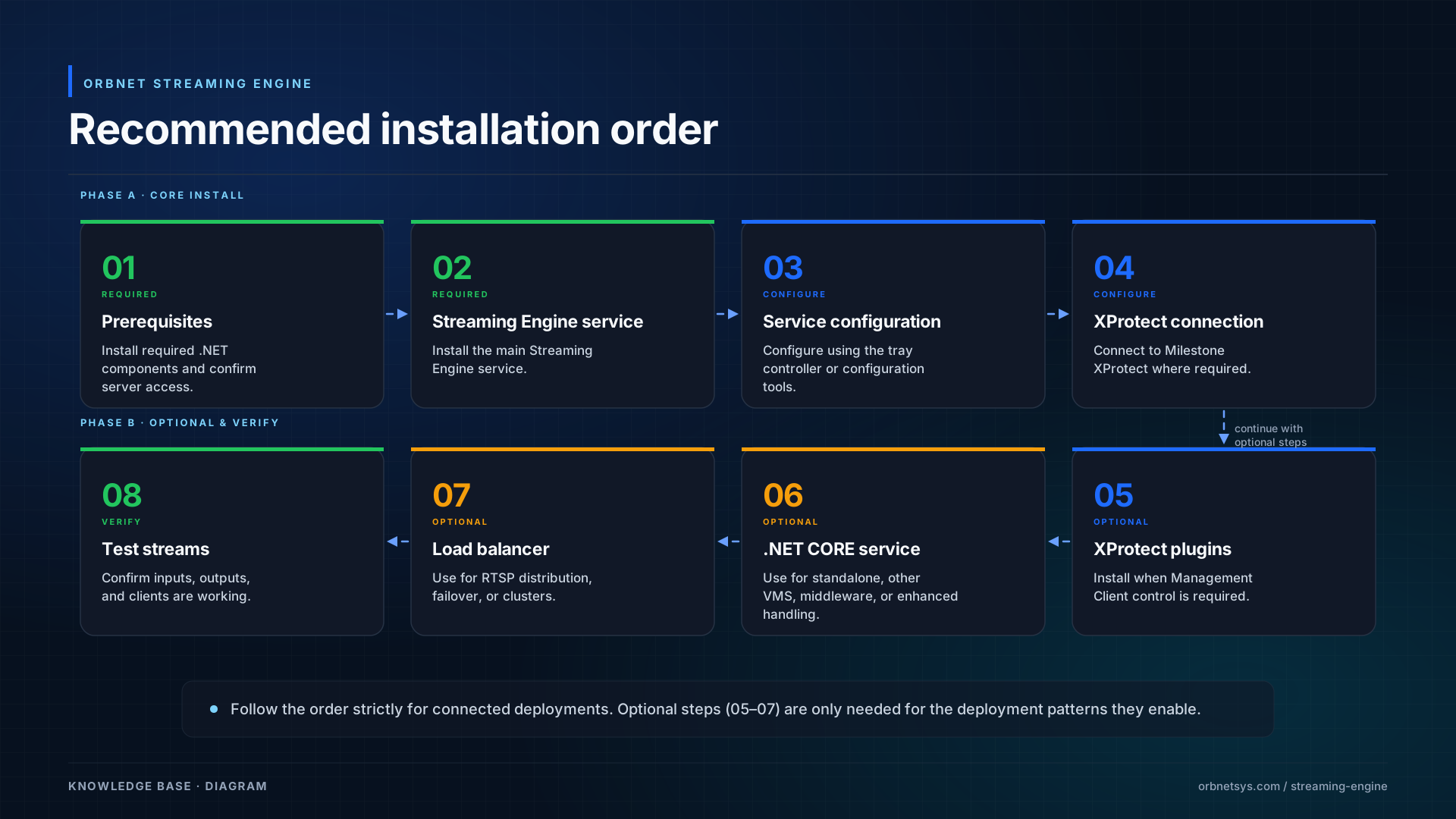 Recommended installation order for ORBNET Streaming Engine components.
Prerequisites
Before installing Streaming Engine components, confirm the following:
• The server meets the required operating system and hardware requirements.
• The required Microsoft .NET components are installed where needed.
• The installer is run using an account with local administrator permissions.
• Required firewall ports are open between Milestone XProtect, Streaming Engine, clients, and any external systems.
• Milestone XProtect services are running and reachable where XProtect integration is required.
• Any required ORBNET licence information is available before configuration.
• Network routing is in place between the Streaming Engine server and any required video sources or clients.
• DNS names, IP addresses, certificates, and public endpoints are available where external access or secure protocols are required.
Main standard installers
| Installer | Purpose | Notes |
|---|---|---|
| ORBNET Streaming Engine Service Setup vx.x.xx.msi | Installs the main Streaming Engine service. | Includes the Streaming Engine service and tray controller application. |
| ORBNET Streaming Engine Plugins Setup vx.x.xx.msi | Installs the XProtect Management Client plugin. | Used to control and configure Streaming Engine features from Milestone XProtect. |
ORBNET Streaming Engine Service Setup vx.x.xx.msi
The ORBNET Streaming Engine Service Setup installer installs the main Streaming Engine service.
This is the standard service component used to connect the Streaming Engine to Milestone XProtect. Once connected, the Streaming Engine can ingest and deliver audio and video streams using a range of supported protocols.
Supported protocols include:
• RTSP
• RTMP
• SRT
• HLS
• WebRTC
The service also includes an API, allowing streams to be published and transcoded programmatically.
This installer includes a tray controller application, which is used to configure and manage the service locally.
The service is compatible with the ORBNET Load Balancer for RTSP stream redirection.
ORBNET Streaming Engine Plugins Setup vx.x.xx.msi
The ORBNET Streaming Engine Plugins Setup installer installs the XProtect plugin components required to control the Streaming Engine from within Milestone XProtect.
This includes the XProtect Management Client plugin, which allows administrators to configure Streaming Engine functionality from the XProtect environment.
Typical use cases include:
• Sharing camera streams from XProtect.
• Publishing camera streams using RTMP or SRT.
• Configuring stream sharing options.
• Using timelapse functionality where available.
• Managing Streaming Engine integration settings from the XProtect Management Client.
Complementary installers
The complementary installers provide additional performance, deployment, and load balancing options.
| Installer | Purpose | Notes |
|---|---|---|
| ORBNET Streaming Engine Service Setup NET CORE vx.x.xx.msi | Installs the newer .NET-based Streaming Engine service. | Can be installed alongside the standard service or used in standalone mode. |
| ORBNET Load Balancer Service Setup vx.x.xx.msi | Installs the ORBNET Load Balancer service. | Currently used for RTSP stream redirection. |
ORBNET Streaming Engine Service Setup NET CORE vx.x.xx.msi
The ORBNET Streaming Engine Service Setup NET CORE installer provides the newer .NET-based Streaming Engine service.
This service can be installed alongside the standard ORBNET Streaming Engine Service where required. It can also be installed in standalone mode for deployments that do not require a direct Milestone XProtect connection.
The newer .NET-based Streaming Engine service is designed to provide improved stream handling and reduced CPU usage compared with the older service architecture.
Actual performance will depend on the server hardware, stream type, resolution, bitrate, codec, protocol, transcoding requirements, and deployment model.
The NET CORE service can also be used in standalone mode to receive streams such as RTMP and SRT, meaning no connection to Milestone XProtect is required in that mode.
Key features include:
• Enhanced stream handling.
• Reduced CPU usage, depending on deployment and workload.
• Support for higher stream counts, depending on server and stream configuration.
• Standalone operation for RTMP and SRT ingest.
• Middleware deployment for web-enabled video or viewing.
• Compatibility with the ORBNET Load Balancer for RTSP stream redirection.
• Operation alongside the standard Streaming Engine service where required.
ORBNET Load Balancer Service Setup vx.x.xx.msi
The ORBNET Load Balancer Service Setup installer installs the ORBNET Load Balancer service.
The load balancer is currently used to redirect RTSP or RTSPS streams across available Streaming Engine servers.
RTSP clients connect directly to the load balancer. The load balancer then redirects the client to the most suitable Streaming Engine server using an RTSP 302 redirect.
The selected server can be based on preferred server rules or balanced rule sets.
The load balancer web interface displays:
• CPU usage for each connected Streaming Engine server.
• RAM usage for each connected Streaming Engine server.
• Number of active connections.
• Load balancing rule configuration.
The load balancer is useful when you need to:
• Distribute RTSP requests across multiple Streaming Engine nodes.
• Provide failover between Streaming Engine servers.
• Manage a cluster of Streaming Engine servers.
• Direct clients to the most suitable available Streaming Engine node.
Future versions are planned to extend load balancing support to additional protocols, such as RTMP, SRT, HLS, WebRTC, and MJPEG. Availability will depend on product version, deployment model, and release status.
The load balancer is also expected to include a richer API for statistics, monitoring, and control in future releases.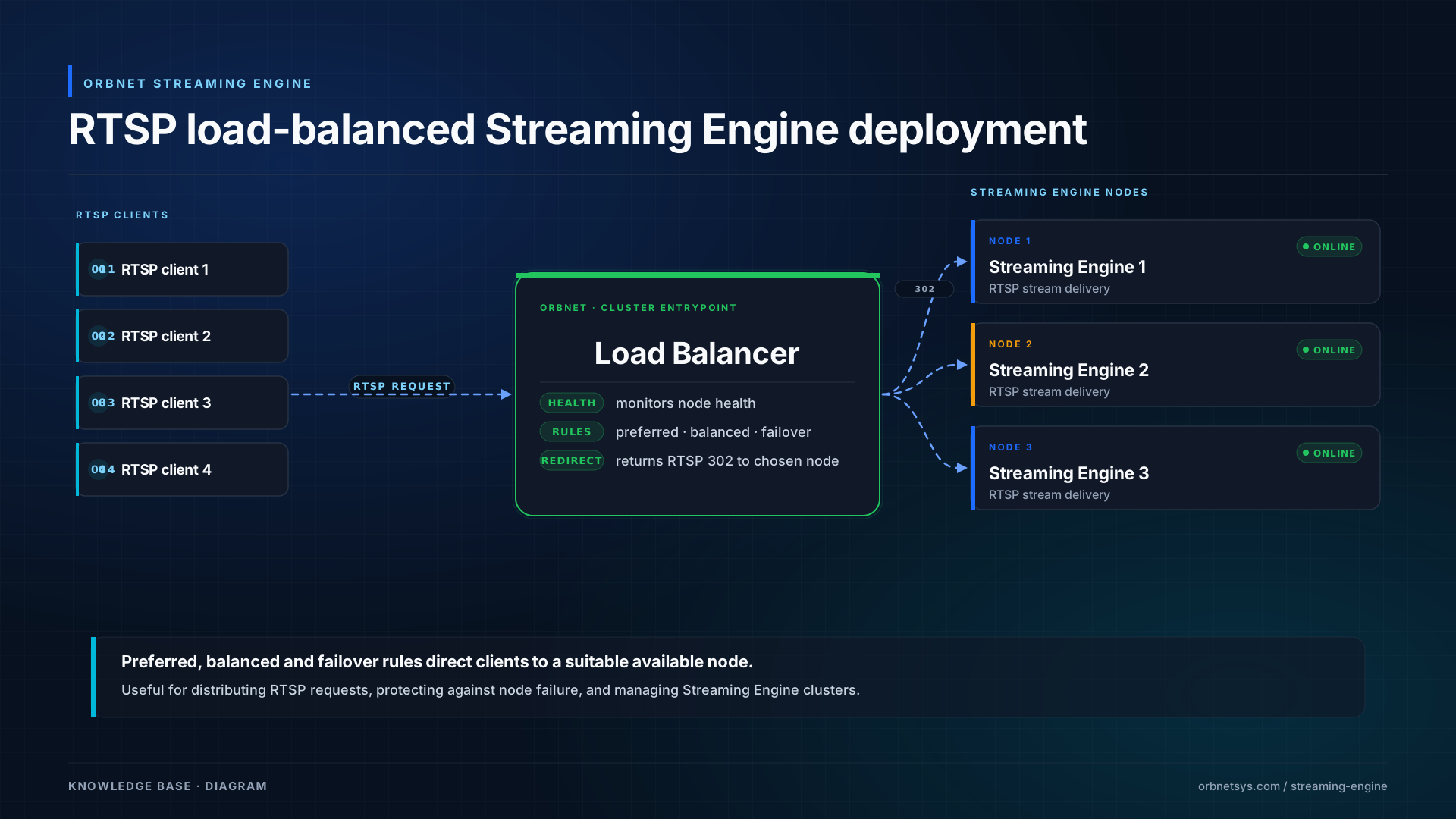
Deployment types
| Deployment type | Components | Typical use |
|---|---|---|
| Standard XProtect-connected deployment | Streaming Engine Service, optionally XProtect Plugins | Used when Streaming Engine connects directly to Milestone XProtect for stream access and publishing. |
| XProtect-managed deployment | Streaming Engine Service and XProtect Plugins | Used when administrators need to manage Streaming Engine functionality from XProtect Management Client. |
| Standalone Streaming Engine deployment | NET CORE Streaming Engine Service | Used when Streaming Engine receives or publishes streams without a Milestone XProtect connection. |
| Other VMS integration deployment | NET CORE Streaming Engine Service | Used when Streaming Engine is deployed with another VMS or external video platform. |
| Middleware or web video deployment | NET CORE Streaming Engine Service, API, required output protocols | Used when Streaming Engine provides web-enabled video, browser viewing, or video access for another application. |
| Load-balanced RTSP deployment | Multiple Streaming Engine nodes and ORBNET Load Balancer | Used to distribute RTSP requests across multiple Streaming Engine servers, provide failover, or manage a cluster of Streaming Engine nodes. |
Deployment topology
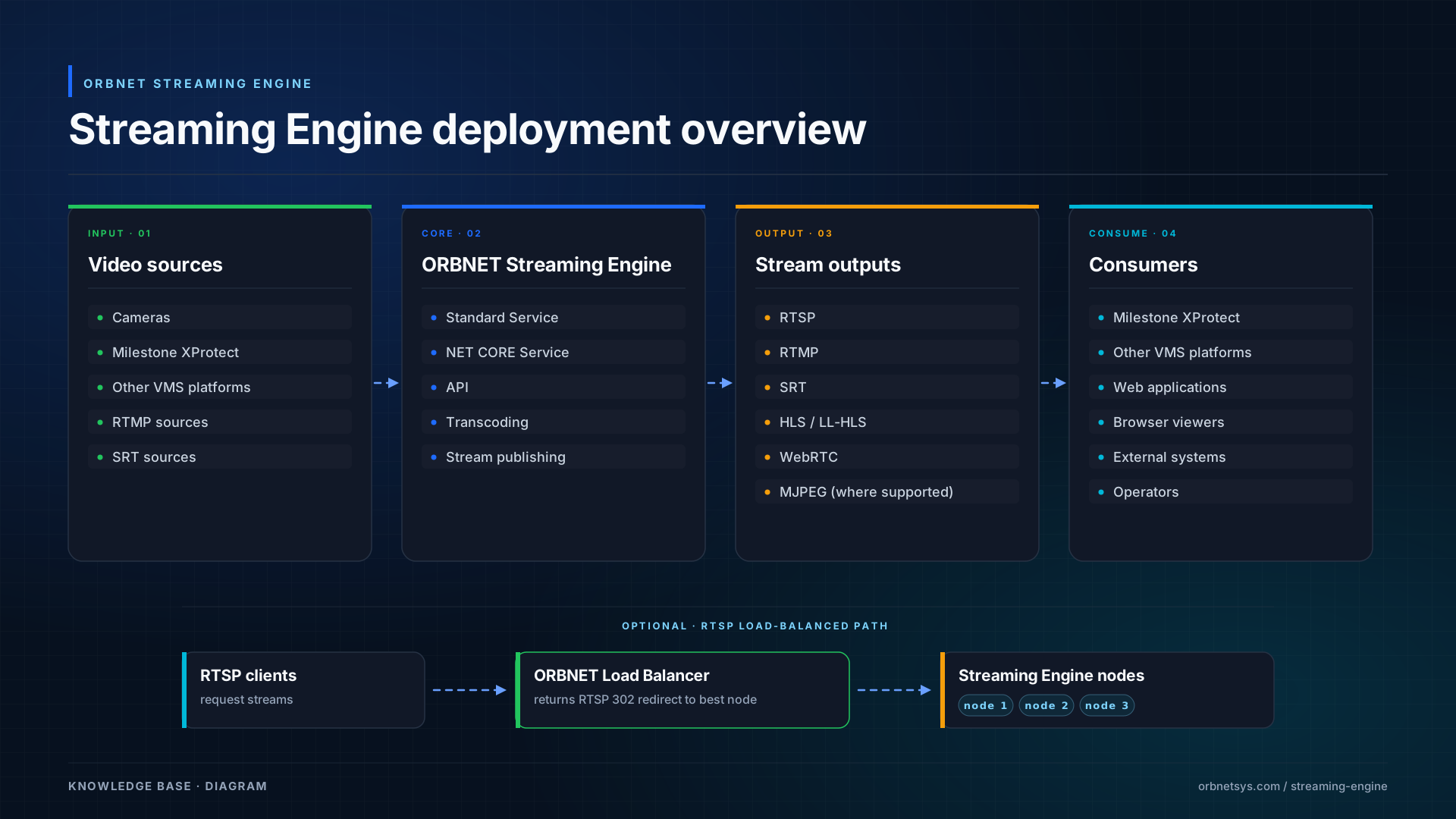 Example deployment topology showing Streaming Engine receiving video from XProtect, other VMS platforms, or direct stream sources, then publishing video to external clients, applications, and viewers.
Protocol usage
Streaming Engine supports a range of video protocols. The exact protocol used will depend on the deployment type, source system, output requirement, and product version.
| Protocol | Typical use |
|---|---|
| RTSP | Commonly used for VMS integration, camera-style stream delivery, and client stream consumption. |
| RTMP | Commonly used for publishing or receiving streams from compatible platforms, encoders, services, or applications. |
| SRT | Used for secure and resilient video transport across unreliable or wide-area networks. |
| HLS | Used for web-based and browser-friendly video playback where low infrastructure complexity is required. |
| WebRTC | Used for low-latency browser-based video playback. |
| MJPEG | Used in some lightweight web, snapshot, or compatibility scenarios where supported. |
Not every protocol is used in the same way or available in every deployment mode. Confirm the required input and output protocol during system design.
.NET 10.0.x Windows Hosting Bundle
The .NET 10.0.x Windows Hosting Bundle is a Microsoft component required for hosting ASP.NET Core applications on IIS or other supported Windows web server environments.
The exact patch version may change over time, for example 10.0.3, 10.0.4, or a later 10.0.x release. Always use the supported .NET 10.0.x Windows Hosting Bundle version recommended by ORBNET Systems or available from the official Microsoft .NET download page.
This component may be required for newer .NET-based Streaming Engine components or supporting web services.
Before installing, verify and download the latest supported .NET 10.0.x Windows Hosting Bundle from the official Microsoft .NET download page:
https://dotnet.microsoft.com/en-us/download/dotnet/10.0
Basic troubleshooting
Use the following checks if installation or initial configuration does not work as expected.
| Issue | Checks |
|---|---|
| Installer fails | Confirm the installer is being run as administrator. Confirm required Microsoft .NET components are installed. Check Windows Event Viewer for installer or service errors. |
| Streaming Engine service does not start | Confirm the service is installed correctly. Check the service account permissions. Check for port conflicts. Review the Streaming Engine logs. |
| XProtect plugin is not visible | Confirm the plugin installer completed successfully. Confirm it was installed on the correct machine. Restart XProtect Management Client. Confirm the installed plugin version matches the Streaming Engine version where required. |
| Cannot connect to XProtect | Confirm XProtect services are running. Check server address, credentials, firewall rules, and network routing. |
| Stream is not available | Confirm the source stream is available. Confirm the Streaming Engine service is running. Check firewall access between the source, Streaming Engine, and client. Test with a known working stream. |
| RTSP load balancing is not working | Confirm all Streaming Engine nodes are reachable from the load balancer. Confirm the load balancer can see node status. Check the configured balancing or preferred server rules. |
| Browser playback is not working | Confirm the selected protocol is supported by the browser or viewer. Check HTTPS, certificates, CORS, firewall rules, and whether the stream is being published correctly. |
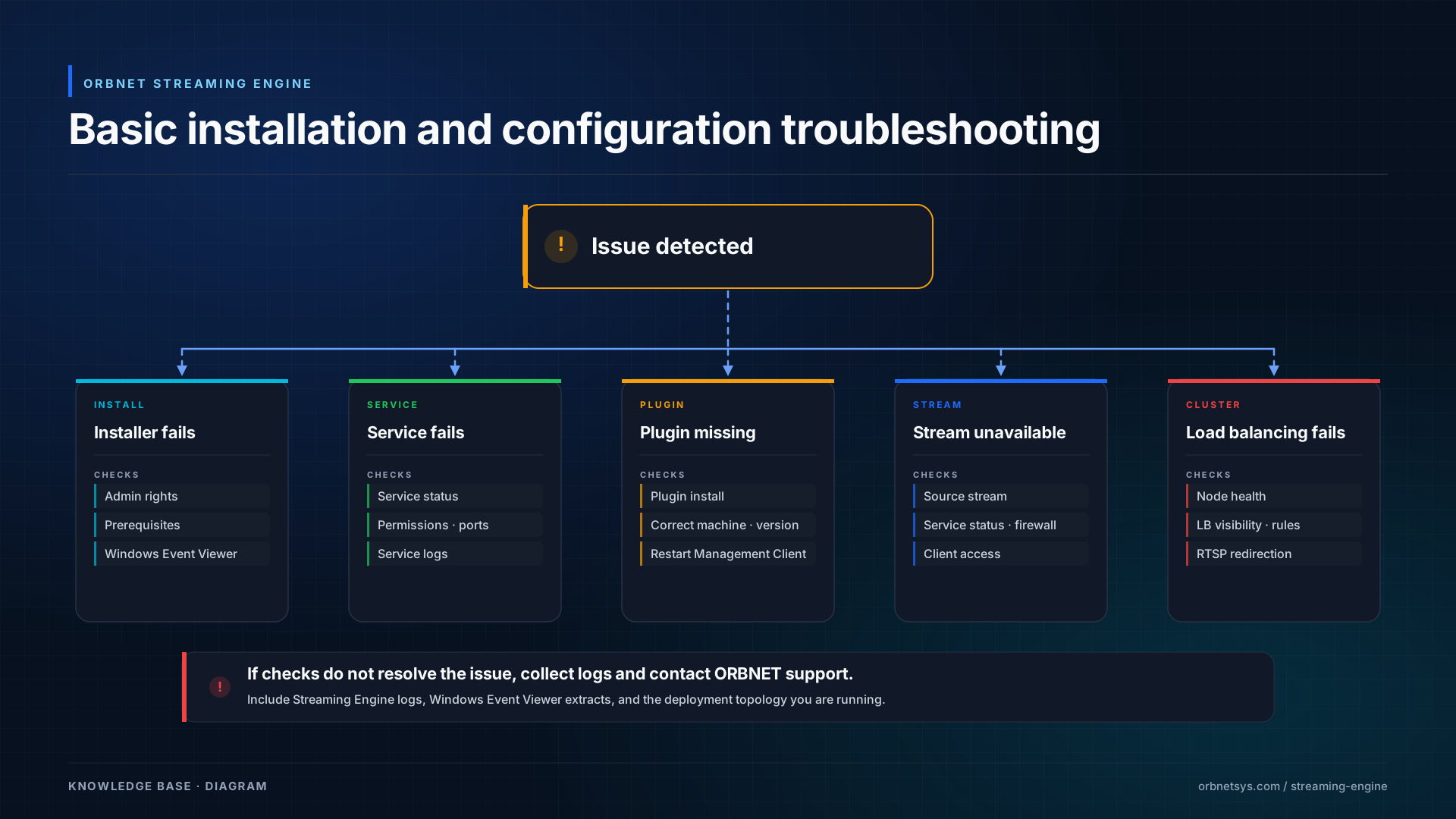 Basic troubleshooting flow for Streaming Engine installation and initial configuration issues.
Summary
The main ORBNET Streaming Engine Service Setup installer provides the core Streaming Engine service for Milestone XProtect-connected deployments.
The ORBNET Streaming Engine Plugins Setup installer adds the XProtect plugin components used to manage Streaming Engine functionality from Milestone XProtect.
The NET CORE service installer provides additional performance, standalone streaming, other VMS integration, and middleware video delivery options.
The ORBNET Load Balancer installer provides RTSP stream redirection, failover, and cluster management across available Streaming Engine servers.
Together, these installers provide the components required for XProtect-connected streaming, standalone stream ingest, browser playback, API-driven publishing, transcoding, and scalable RTSP delivery.