
This article explains how the ORBNET Brivo integration uses Brivo API calls, what can affect the number of calls made, and how this relates to Brivo API subscription tiers.
API usage will vary from one site to another. The total number of API calls depends on factors such as the number of doors, number of cardholders, how often the Event Server is restarted, and how active the site is during normal day-to-day operation.
ORBNET has designed the integration to be as efficient as possible, helping reduce unnecessary API usage while still keeping the Milestone XProtect environment updated with Brivo access control information.
Why API usage varies
Every Brivo deployment is different.
A small site with a limited number of doors and users will normally make fewer API calls than a larger site with many access points, cardholders, and regular changes.
API usage can be affected by:
| Factor | Effect on API usage |
|---|---|
| Number of cardholders | More users may require more API calls during initial loading or cache refresh. |
| Number of user images | Each user image requires an individual API call, although images are cached after retrieval. |
| Number of doors or access points | Larger configurations require more calls when loading access point data and refreshing states. |
| Event Server restarts | A restart may trigger configuration loading, state synchronisation, and user cache refresh activity. |
| Network interruptions | If the connection is restored after an interruption, the system may refresh states. |
| Site activity | Busy sites may require more interaction with cached data and state updates over time. |
How the integration reduces API calls
The integration has been optimised to reduce unnecessary API usage wherever possible.
For example, the system caches user information and user images so that the same information does not need to be repeatedly requested from Brivo.
The system also loads users in pages rather than making inefficient individual requests for each user record.
Once the system is running, Brivo provides state updates for doors. This means the integration does not need to continuously poll the Brivo API for every door state change or icon update in Milestone XProtect.
You may wish to confirm with Brivo directly, but event notifications are generally separate from standard API polling and may not be charged in the same way as API calls.
When API calls are made
The integration uses API calls for specific actions and synchronisation tasks.
| API activity | Description | Caching behaviour |
|---|---|---|
| Getting users | User records are loaded in pages and cached by the integration. | Cached and refreshed after the configured UserCacheInvalidationHours period. |
| Getting user pictures | Each individual user picture requires an API call. | Pictures are cached after retrieval. |
| Loading initial configuration | Access point data is loaded when the system starts or configuration is refreshed. | Configuration data is cached where appropriate. |
| Refreshing all states | Door and access point states may be refreshed when the Event Server restarts or when network connectivity is restored. | State updates are then maintained through Brivo updates where available. |
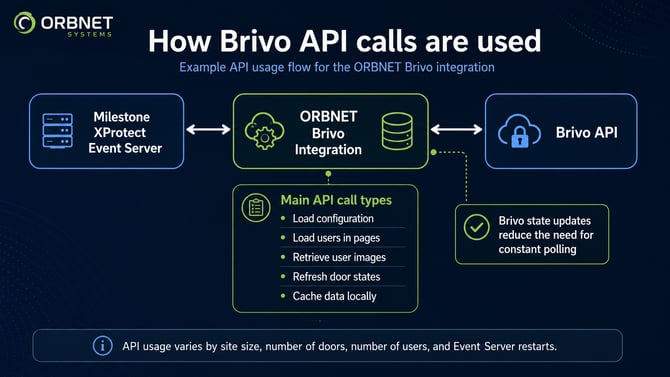
Example API usage flow showing how the ORBNET Brivo integration communicates with the Brivo API and caches data to reduce unnecessary API calls.
Startup and synchronisation behaviour
A larger number of API calls may be made when the Milestone XProtect Event Server starts.
This is expected behaviour.
During startup, the integration may need to:
• Load the initial Brivo configuration.
• Retrieve access point information.
• Re-cache users if required.
• Retrieve user pictures where they are not already cached.
• Synchronise door and access point states.
This startup process ensures that Milestone XProtect has an accurate view of the Brivo system.
After the initial synchronisation has completed, API usage is normally reduced because cached data and Brivo state updates are used wherever possible.
Monitoring API usage
The integration logs API usage directly in the Milestone XProtect Event Server MIP log.
Each time an API call is made, the total count is logged using the following entry:
Total API calls:
This can be used to estimate real-world API usage for a specific site.
For the most accurate estimate, monitor the log over a representative period, such as several days or weeks. This gives a better view of normal usage, including daily activity, restarts, and any scheduled maintenance.
Brivo also tracks API usage against the active API key subscription.
Estimating the correct Brivo API subscription
The correct Brivo API subscription tier will depend on the size of the Brivo account and how often Milestone needs to communicate with the Brivo API.
API activation is account-wide, so the API subscription applies to all sites and panels included in that Brivo account.
When choosing a subscription tier, consider:
• Number of sites in the Brivo account.
• Number of doors and access points.
• Number of users and cardholders.
• Number of user images.
• Expected Event Server restart frequency.
• Network reliability.
• Overall site activity.
• Required operational margin below the Brivo API call limit.
Brivo API subscription tiers
Each Brivo API key subscription operates on a rolling 30-day period with a set number of API calls.
If the customer approaches the limit, usually at around 80%, the owner of the Brivo Developer account will be notified by email.
If the API key exceeds its rolling 30-day limit, the application associated with that key will stop communicating with the Brivo API until the allowance is restored.
It is important that the customer and integrator select the correct subscription tier to maintain normal operation.
| Brivo API tier | API call allowance |
|---|---|
| Tier 0 | 100,000 calls per rolling 30 days |
| Tier 1 | 500,000 calls per rolling 30 days |
| Tier 2 | 1,000,000 calls per rolling 30 days |
| Tier 3 | 2,000,000 calls per rolling 30 days |
Recommended approach
For new deployments, ORBNET recommends monitoring actual API usage after installation.
A practical approach is:
| Step | Action |
|---|---|
| 1 | Confirm the number of Brivo sites, panels, doors, and users. |
| 2 | Select a suitable Brivo API subscription tier with enough headroom for normal operation. |
| 3 | Monitor Total API calls: in the Event Server MIP log after deployment. |
| 4 | Review API usage after several days or weeks of normal operation. |
| 5 | Adjust the Brivo API subscription tier if required. |
This approach allows the customer to base their subscription on actual site behaviour rather than guesswork.
Summary
API usage will vary depending on the size and activity of the Brivo deployment.
The ORBNET Brivo integration has been designed to minimise unnecessary API calls through caching, paged user loading, cached user images, and Brivo state updates.
Most API usage occurs during startup, configuration loading, user caching, image retrieval, and state refresh operations.
For live systems, the best way to estimate ongoing usage is to monitor the Total API calls: entries in the Milestone XProtect Event Server MIP log and compare this against the customer’s Brivo API subscription allowance.