ORBNET's i-PRO integrations bring advanced camera intelligence, AI search, camera control and alarm workflows into Milestone XProtect.
ORBNET provides the Milestone XProtect integration layer for these i-PRO workflows.
Two i-PRO integration options
Choose the Integration That Matches the Workflow
Active Guard focuses on AI-assisted search and investigation. Maximizer focuses on extended i-PRO camera control, alarms and automation inside Milestone XProtect.
Search and investigation
i-PRO Active Guard for XProtect
Search i-PRO Active Guard metadata and best-shot images from the XProtect Smart Client, supporting faster review of people, vehicles, faces and watchlist-related events.
Extend Milestone XProtect with additional i-PRO camera controls, alarms and automation options that are not normally available through standard XProtect controls.
Please note: ORBNET provides the integration software and technical resources for these i-PRO workflows. For i-PRO camera hardware and licensing enquiries, please speak with i-PRO or your authorised reseller. For sales enquiries, please contact i-PRO directly at i-pro.tap@i-pro.com. For technical support, please email support@orbnetsys.com.
Search and investigation
i-PRO Active Guard: AI Search Inside XProtect
Search i-PRO Active Guard metadata and best-shot images directly from the Milestone XProtect Smart Client, helping operators review people, vehicles, faces and watchlist-related events without leaving the VMS.
Active Guard search results and best-shot thumbnails are displayed inside the XProtect Smart Client, helping operators move quickly from search result to recorded video context.
Vehicle Search Results
Review matching results and jump into relevant recorded video from the Smart Client workflow.
Active Guard Search Tile in XProtect
Operators can access Active Guard search directly from the XProtect Smart Client, helping them search people, vehicles, faces and best-shot thumbnails without leaving the VMS workflow.
Vehicle Search Filters
Filter vehicle results by available metadata such as type, colour or direction.
People Search Filters
Search by useful people attributes and metadata captured by compatible i-PRO AI cameras.
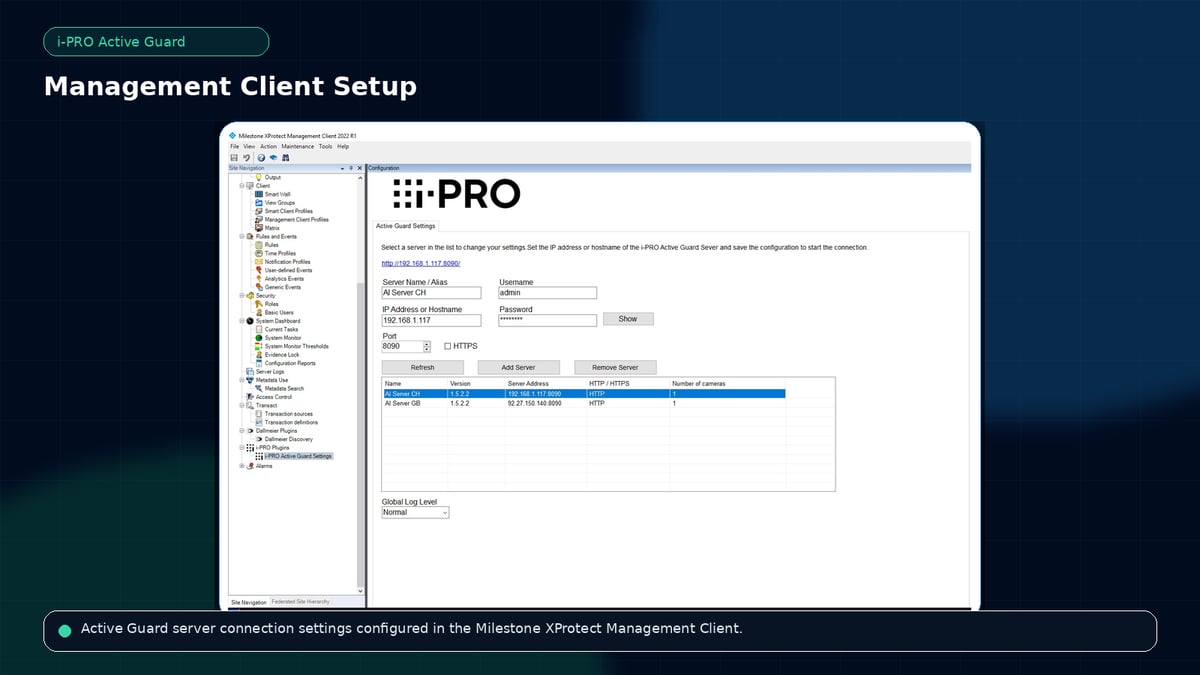
Active Guard Management Client Configuration
Configure the connection between Milestone XProtect and the i-PRO Active Guard server, allowing operators to search AI metadata and best-shot results from the XProtect Smart Client.
i-PRO Active Guard plug in for Milestone XProtect
Fast and intuitive, i-PRO Active Guard creates a more efficient and accurate AI-powered system without compromising on image quality or network performance.
Camera control and automation
i-PRO Maximizer: Advanced Camera Control in XProtect
Extend Milestone XProtect with additional i-PRO camera controls, actions, alarms and automation options that are not normally available through standard XProtect controls.
Expose supported i-PRO privacy functions through the XProtect environment.
Group Action Configuration
Group camera actions and make advanced i-PRO functions easier to configure and use.
Smart Client Actions
Make supported i-PRO camera actions available where operators need them.
XProtect Extended Actions
i-PRO Maximizer helps bring additional camera functions into XProtect, including camera controls, privacy options, custom commands, expanded alarms and rules-based automation.